iPad Stylus: Type-C Standard Edition and Magnetic Charging Upgraded Edition
A stylus for writing notes, annotating PDFs, and drawing on iPad, with a white body. Available in two versions: the Type-C charging standard edition (HK$138) and the upgraded edition with magnetic charging and battery level display (HK$199); please check your iPad model and required features before purchasing.
Product Features
-
Writing and Drawing: Product information lists tilt writing, palm rejection, and a low-latency experience; actual performance depends on the iPad and the app used.
-
Stylus Body Shortcuts: Tools can be switched using stylus body operations such as single-tap, double-tap, and long press (e.g., brush, eraser, screenshot, page turning); actually available features depend on settings and the app.
-
Replaceable Tip: The tip can be twisted off and replaced, and a paper-like silent damping tip is included; please check that the size is compatible before replacing it with other tips.
-
Matte One-Piece Body: Product images show a white matte body design.
Edition Comparison Table
| Item |
Standard Edition |
Upgraded Edition |
| Charging Method |
Type-C Charging |
Magnetic Charging (Requires a Compatible iPad); Product information also lists Type-C charging |
| Battery Level Display |
No Battery Level Display |
With Battery Level Display (View on iPad via Bluetooth) |
| Tip |
Twist-Off and Replaceable, Includes Paper-Like Silent Damping Tip |
| Color |
White |
| Price |
HK$138 |
HK$199 |
Compatible Models
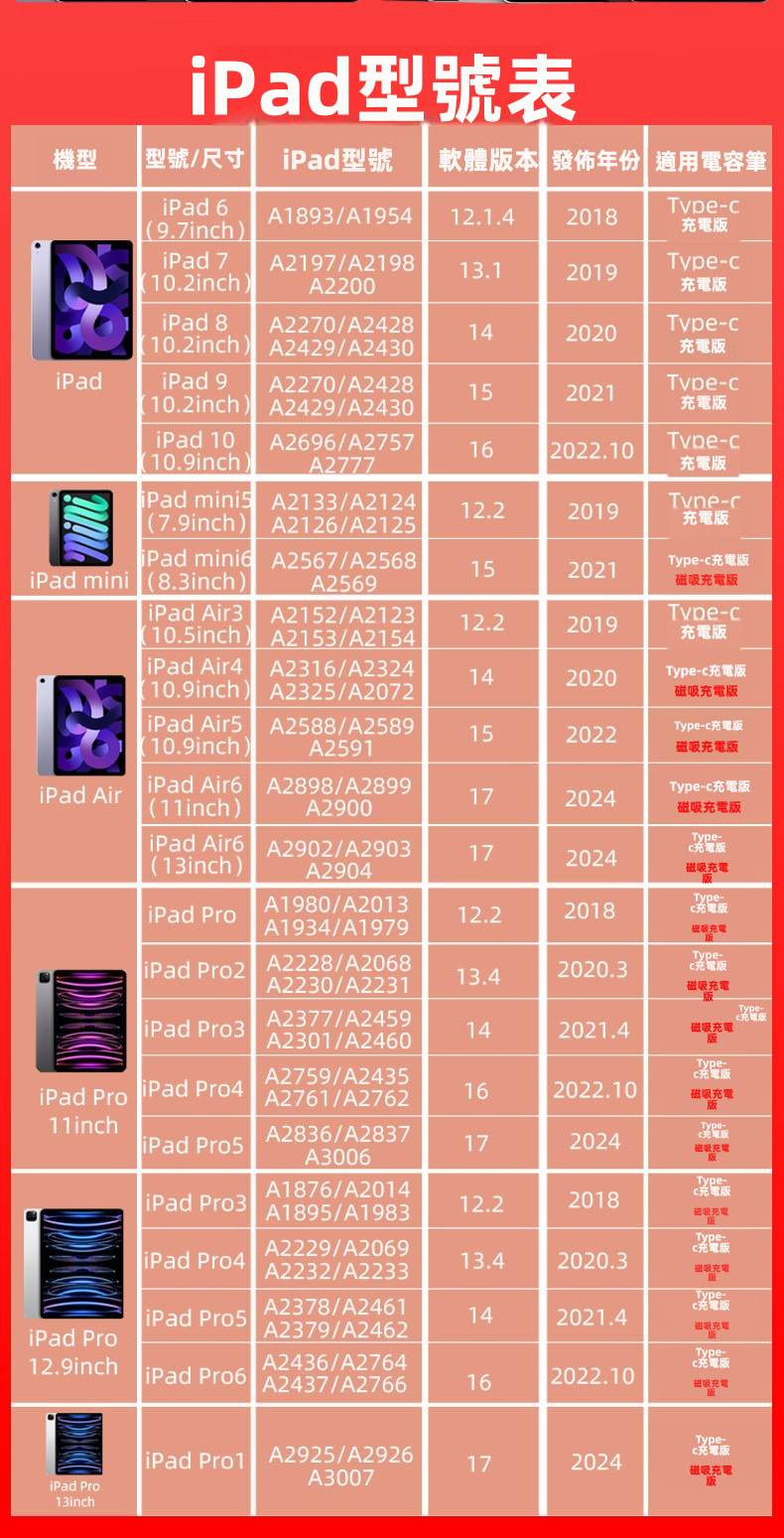
Product images include an iPad model comparison table, covering models from 2018 onwards such as iPad (6th to 10th Generation), iPad mini (5th and 6th Generation), iPad Air (3rd to 6th Generation), and multiple generations of iPad Pro (11-inch, 12.9-inch, and 13-inch); the magnetic charging edition is only compatible with models that support magnetic charging. The contents of the comparison table are subject to the product images; please check your iPad model and required edition before purchasing.
Usage Scenarios
Handwriting notes in class or during meetings, annotating PDFs and documents, drawing and doodling, and using "Scribble" to handwrite input in text fields.
Frequently Asked Questions (FAQ)
Q: What is the difference between the standard edition and the upgraded edition?
A: The standard edition uses Type-C charging and does not feature magnetic charging or battery level display; the upgraded edition features magnetic charging and battery level display, with magnetic charging requiring a compatible iPad.
Q: Can I use it with my iPad?
A: Product images include a model comparison table covering multiple generations of iPad, iPad mini, iPad Air, and iPad Pro from 2018 onwards. Please check the table for your iPad model before purchasing, and note that the magnetic charging feature is only compatible with supported models.
Q: How do I charge the standard edition?
A: The standard edition charges via a Type-C port; the upgraded edition can charge via Type-C or by attaching it to a compatible iPad for magnetic charging.
Q: How do I check the battery level of the upgraded edition?
A: After connecting the upgraded edition via Bluetooth, you can view the stylus battery level in the battery widget on your iPad; the standard edition does not feature a battery level display.
Q: Can the tip be replaced?
A: Yes, the tip features a twist-off design and includes a paper-like silent damping tip; before replacing it with a tip from another brand, please check that the size is compatible.
Q: What are the stylus body shortcuts used for?
A: Product information states that you can switch between features such as brush, eraser, screenshot, and page turning by single-tapping, double-tapping, or long pressing, and also configure them within the dedicated app; actually available features depend on the iPad model, settings, and the app used.